Clipman
A clipper and saturator as a VST3. Hard, soft, or somewhere in between.
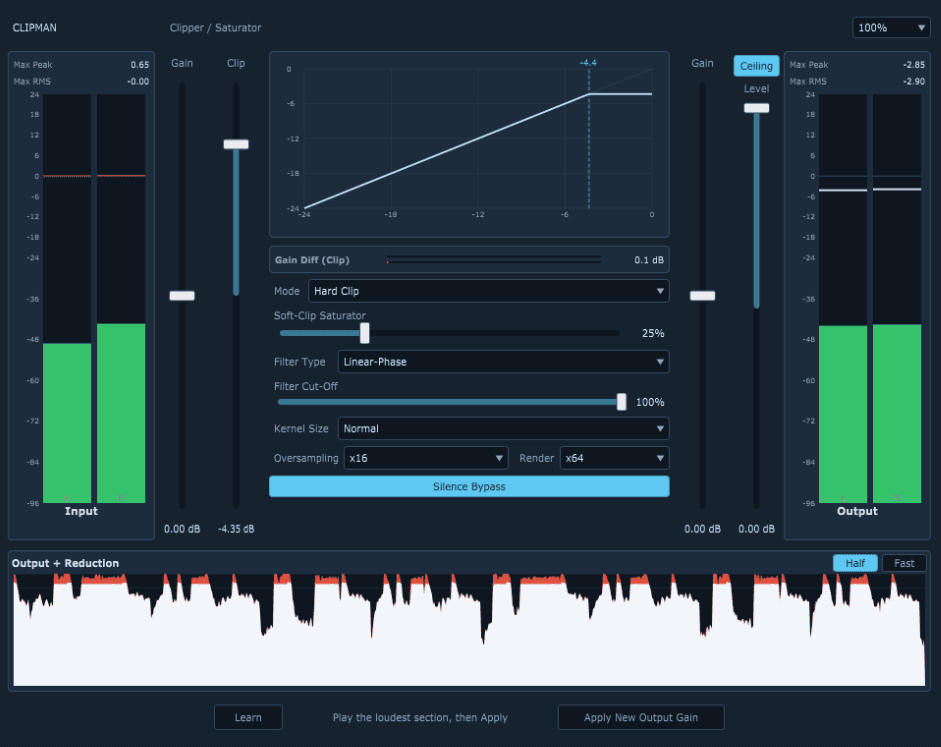
Clipman is a clipper and saturator, available as a VST3 plugin and a standalone app. It cuts off peaks above an adjustable threshold, either hard or soft, and shows you exactly what happens.
Try it
Recreated in the browser, no download needed.
Recreated in the browser with the same clipping math as the plugin. Left the transfer curve, right the level: red is what goes into the clipper, white is what comes out.
What Clipman does
Three clip modes
Hard Clip cuts off sharply at the threshold. Soft Clip Classic saturates across the whole range like a tanh curve. Soft Clip Pro stays linear until just below the threshold and then rounds off smoothly; the saturator control (0–100 %) sets how early that starts.
Ceiling as a final safety net
An optional second hard clip at the very end (−3 to 0 dBFS) makes sure nothing goes above it.
Oversampling up to x64
Clipping creates harmonics that fold back as aliasing without oversampling. Clipman runs at x1 to x64 and has a separate factor for exporting: light while tracking, thorough when bouncing. Filter type (linear phase or minimum phase), cut-off and steepness are adjustable.
Transfer curve and history
The transfer curve shows live how input level turns into output level, with a dot for the current level. The “Output + Reduction” history shows the level before the clipper in red and after it in white. Any red above the white is what got clipped.
Metering
Peak and RMS meters for input and output with peak hold and latched maximum values. A separate gain difference meter shows only what the clipper itself takes away, without output gain and ceiling.
Output gain assistant
Turn on Learn, play the loudest part, click “Apply New Output Gain”: Clipman sets the output gain so the peak lands exactly on the ceiling.
How to use Clipman
- Put Clipman on the track or bus whose peaks you want to tame, for example drums or the master.
- Use Input Gain and Clip to set how much gets cut off. The history shows what's removed in red.
- Pick the mode: Hard Clip for maximum loudness on short transients, Soft Clip when it should sound rounder.
- Feel free to set a higher oversampling factor for export. Clipman only uses it while rendering.
Key facts
- Price
- free
- Formats
- VST3, Standalone
- System
- Windows (64-bit)
- Tested in
- FL Studio
- Type
- Clipper / saturator
- Version
- 0.1.0
- Status
- finished, in use
- Built with
- JUCE (C++)
Clipman is my first audio plugin, built with a lot of help from AI (vibe-coded). It is finished and I use it in my own productions.
Installation
- Download the ZIP file and unzip it.
- Copy the “Clipman.vst3” folder to C:\Program Files\Common Files\VST3 and let your DAW rescan for plugins. In FL Studio, use “Find installed plugins” in the Plugin Manager.
- Without a DAW: run Clipman.exe. Because the file isn't signed, Windows may warn you on first start. Choose “More info” and “Run anyway”.
SHA-256 checksum: 83dfb3069c0a171562d4cd7a33d82499cd3869b8f87d71844f5c9290f9e1fd0b
The files are not digitally signed. Use at your own risk, no warranty.
FAQ
›What is the difference between hard clipping and soft clipping?
Hard clipping cuts everything above the threshold flat. It's the loudest option but can sound harsh. Soft clipping rounds off the peaks and sounds warmer, but takes away some level before the threshold.
›Why does a clipper need oversampling?
Clipping creates harmonics above the Nyquist frequency. Without oversampling they fold back into the audible range as aliasing. With oversampling they are filtered out first.
›What does the ceiling do?
The ceiling is a second hard clip at the end of the signal chain. It guarantees the output never goes above a set limit between −3 and 0 dBFS.
›Does Clipman work in FL Studio?
Yes. I use Clipman in FL Studio myself, precisely because FL Studio doesn't come with its own hard clipper.
›Is Clipman free?
Yes. You can download and use Clipman for free, as a VST3 plugin and as a standalone app.
›Which DAWs does Clipman work in?
Tested in FL Studio. As a regular VST3 plugin, Clipman should work in any DAW that supports VST3, for example Ableton Live, Cubase, Reaper, Bitwig or Studio One.
›Does Clipman run on a Mac?
So far there is only a Windows version (64-bit). I haven't tested macOS, so I'm not offering it yet.
More audio plugins
Questions or ideas? Get in touch.
VST is a registered trademark of Steinberg Media Technologies GmbH.